
The Executive
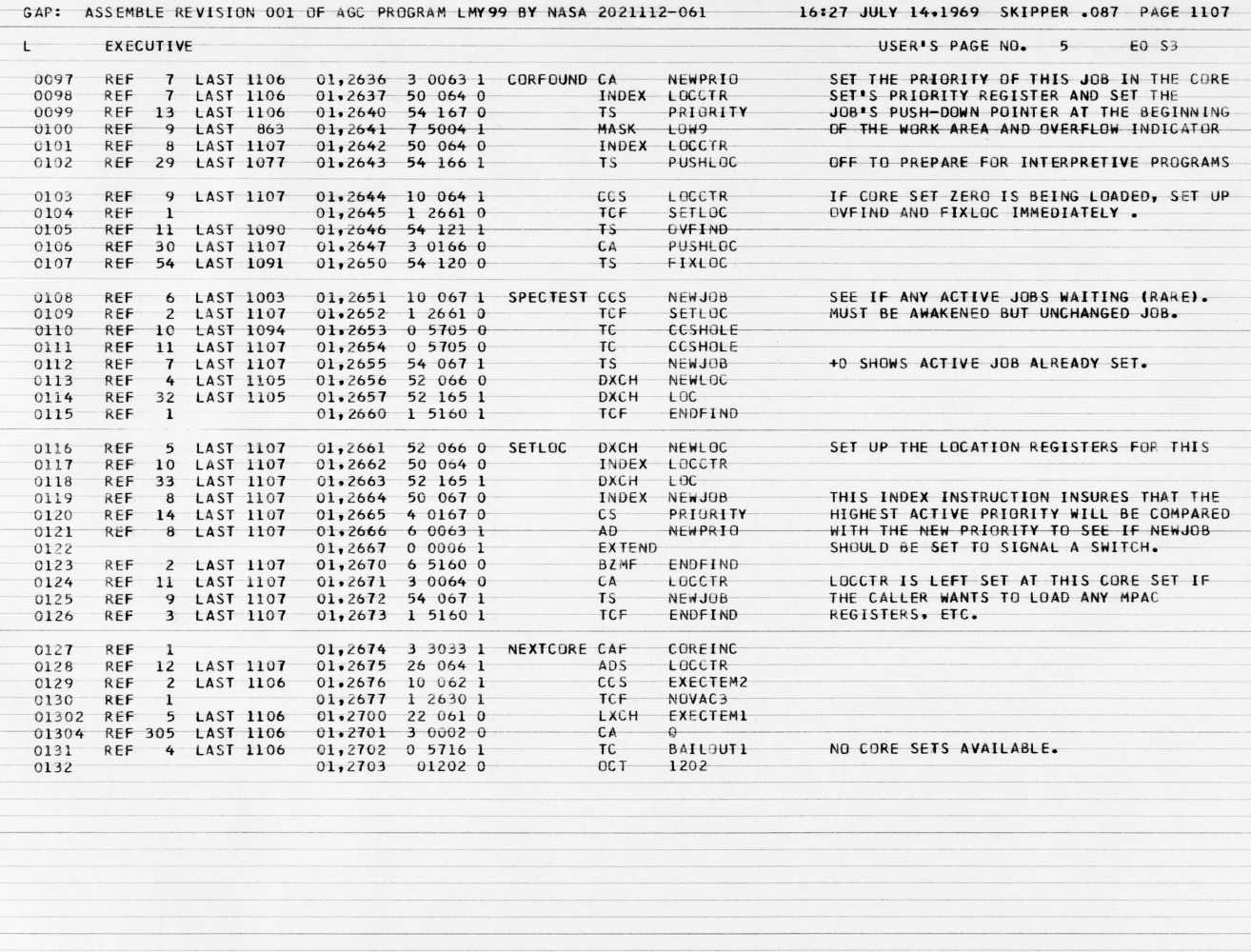
Page 1107 of the actual Luminary099 assembly listing, photographed at the MIT Museum by Paul Fjeld for the Virtual AGC project. At the very bottom — “NO CORE SETS AVAILABLE. OCT 1202.” This alarm fired three minutes before landing.
If there is one piece of software that earned Margaret Hamilton the Presidential Medal of Freedom, it is the Executive. This is the priority-based job scheduler at the heart of the AGC — the system that decided which computations ran, which waited, and which got discarded when the computer ran out of resources.
On July 20, 1969, the Executive is what kept the guidance equations running while the computer was being overloaded by a hardware error. Without it, the lunar landing would have been aborted.
How It Works
Section titled “How It Works”The AGC could not run multiple programs simultaneously. It had one processor, one accumulator, and a small set of registers. But it needed to manage many concurrent activities: guidance computations, display updates, autopilot cycling, engine commands, telemetry, and more.
The Executive solved this by maintaining a pool of seven core sets — blocks of 12 erasable registers each. A core set stored everything needed to suspend and resume a job: its address, priority, bank settings, and a working area for interpretive computation.
When a new job was requested, the Executive searched for a free core set. If the new job had higher priority than the currently running job, it preempted it — swapping all the register contents and resuming the higher-priority work.
NOVAC and FINDVAC
Section titled “NOVAC and FINDVAC”Programs entered the Executive through two entry points:
# TO ENTER A JOB REQUEST REQUIRING NO VAC AREA:
NOVAC       INHINT            AD      FAKEPRET    # LOC(MPAC +6) - LOC(QPRET)            TS      NEWPRIO     # PRIORITY OF NEW JOB + NOVAC C(FIXLOC)
# TO ENTER A JOB REQUEST REQUIREING A VAC AREA -- E.G., ALL# (PARTIALLY) INTERPRETIVE JOBS.
FINDVAC INHINT TS NEWPRIONOVAC (“no VAC”) was for simple basic-language jobs that needed only a core set. FINDVAC (“find VAC”) was for jobs that also needed one of five VAC areas — 44-word blocks of erasable memory used by the interpretive programs for their push-down stacks and temporary storage.
The distinction matters because VAC areas were even more scarce than core sets. There were only five of them.
The Core Set Search
Section titled “The Core Set Search”The core set search is a linear scan through all seven sets:
NOVAC2 CAF ZERO # NOVAC ENTERS HERE. FIND A CORE SET. TS LOCCTR CAF NO.CORES # SEVEN SETS OF ELEVEN REGISTERS EACH.NOVAC3 TS EXECTEM2 INDEX LOCCTR CCS PRIORITY # EACH PRIORITY REGISTER CONTAINS -0 IF TCF NEXTCORE # THE CORRESPONDING CORE SET IS AVAILABLE.Each core set’s PRIORITY register tells its state: negative zero (-0) means available, a positive value means an active job is using it, and a negative non-zero value means a sleeping job occupies it.
The VAC Area Search
Section titled “The VAC Area Search”Similarly, FINDVAC searches five VAC-use registers:
FINDVAC2	TS	EXECTEM1	# (SAVE CALLER'S BANK FIRST.)
	CCS	VAC1USE
	TCF	VACFOUND
	CCS	VAC2USE
	TCF	VACFOUND
	CCS	VAC3USE
	TCF	VACFOUND
	CCS	VAC4USE
	TCF	VACFOUND
	CCS	VAC5USE
	TCF	VACFOUND
	LXCH	EXECTEM1
	CA	Q
	TC	BAILOUT1
	OCT	1201		# NO VAC AREAS.
If no VAC area is available, the computer triggers alarm 1201 — “Executive overflow, no VAC areas.” This is the less famous sibling of the 1202 alarm.
The 1202 Alarm
Section titled “The 1202 Alarm”The 1202 alarm fires from the core set search:
NEXTCORE	CAF	COREINC
	ADS	LOCCTR
	CCS	EXECTEM2
	TCF	NOVAC3
	LXCH	EXECTEM1
	CA	Q
	TC	BAILOUT1	# NO CORE SETS AVAILABLE.
	OCT	1202
When all seven core sets are occupied and a new job request arrives, the Executive has no room. It triggers alarm 1202 — “Executive overflow, no core sets available.”
Priority and Preemption
Section titled “Priority and Preemption”When a new job’s priority exceeds the current job’s, the Executive performs a full context switch — the CHANJOB routine:
CHANJOB     INHINT            EXTEND            ROR     SUPERBNK        # PICK UP CURRENT SBANK FOR BBCON            XCH     L               # LOC IN A AND BBCON IN L. +4         INDEX   NEWJOB          # SWAP LOC AND BANKSET.            DXCH    LOC            DXCH    LOC
            CAE     BANKSET            EXTEND            WRITE   SUPERBNK        # SET SBANK FOR NEW JOB.            DXCH    MPAC            # SWAP MULTI-PURPOSE ACCUMULATOR AREAS.            INDEX   NEWJOB            DXCH    MPAC            DXCH    MPAC
The swap continues through MPAC+2, MPAC+4, MPAC+6, the push-down location, the overflow indicator, and the priority register itself. Every piece of state is exchanged between core set 0 (the active set) and the new job’s core set. After the swap, the new job resumes exactly where it left off.
This was all done in fewer than 50 instructions.
EJSCAN — The Priority Scanner
Section titled “EJSCAN — The Priority Scanner”When a job ends or sleeps, the Executive scans all seven core sets to find the highest-priority active job:
EJSCAN      CCS     PRIORITY +12D            TC      EJ1            TC      CCSHOLE            TCF     +1
            CCS     PRIORITY +24D   # EXAMINE EACH PRIORITY REGISTER TO FIND            TC      EJ1             # THE JOB OF HIGHEST ACTIVE PRIORITY.            TC      CCSHOLE            TCF     +1
            CCS     PRIORITY +36D            TC      EJ1
The scan proceeds through all seven core sets (each 12 registers apart). The EJ1 subroutine compares each active job’s priority against the running maximum. When the scan completes, NEWJOB is set to the relative address of the winning core set.
If no active jobs are found, the computer enters the idle loop — DUMMYJOB:
DUMMYJOB CS ZERO # SET NEWJOB TO -0 FOR IDLING. TS NEWJOB RELINT CS TWO # TURN OFF THE ACTIVITY LIGHT. EXTEND WAND DSALMOUTThe green “COMP ACTY” light on the DSKY goes dark. The computer waits.
The Waitlist
Section titled “The Waitlist”Working alongside the Executive is the Waitlist — a time-based task scheduler. While the Executive manages jobs that run whenever CPU time is available, the Waitlist manages tasks that must execute at specific times.
The Waitlist maintains two parallel arrays: LST1 holds delta-times between consecutive tasks, and LST2 holds the two-word addresses (2CADRs) of up to nine pending tasks. A hardware timer (TIME3) triggers interrupts that dispatch tasks from the list.
WAITLIST INHINT XCH Q # SAVE DELTA T IN Q AND RETURN IN TS WAITEXIT # WAITEXIT. EXTEND INDEX WAITEXIT DCA 0 # PICK UP 2CADR OF TASK.Tasks are short-lived and execute under interrupt — they must complete quickly and finish with TC TASKOVER. Jobs, by contrast, run in the Executive’s core sets and can be preempted.
If the Waitlist overflows — more than nine tasks pending — the computer fires alarm 1203:
FILLED		DXCH	WAITEXIT
	TC	BAILOUT1	# NO ROOM IN THE INN
	OCT	01203
“No room in the inn.” Even the abort comments had a sense of timing.
The Design Philosophy
Section titled “The Design Philosophy”The Executive embodies a principle Hamilton articulated throughout her career: the system must protect itself from its own errors and from unpredictable conditions. The priority scheduler was not an afterthought bolted onto a batch-processing system. It was designed from the ground up to handle the case where the computer had more to do than it could accomplish — and to make the right choices about what to keep and what to discard.
That design philosophy is what turned the 1202 alarm from a potential mission abort into a recoverable event. The computer was overloaded, but it was overloaded in the way Hamilton planned for.